Showing posts with label Project 50. Show all posts

Thursday, September 8, 2011

Project 50 - Week 7 - Concept


Project 50 – Week 7
Concept: Deco Details
Okay, I know this week is starting a bit late but I have a couple weeks worth of projects that I need to make up, so I’m going to try and get Week 7 and 8 done in one week.  For Week 7, I am revisiting some of the Deco books that Theresa made, but in a different way – in a macro way!  A few of the cards had some really interesting detail and texture that I wanted to show off in a bit more detail.  So, while technically the subject is the same, I’m featuring it in a totally different way. 
I hope you enjoy them!  Oh, as a bonus, I’ve decided to run a little contest (more info to come) and give away some free prints.  I’ll post the details later this week! 

Sunday, September 4, 2011

Project 50 - Week 6 - Down-Low on Deco


Project 50 – Week 6
Concept: Down-Low on Deco
This week Theresa was kind enough to create five Deco books that shall soon be traveling all over the world!  I was able to snap a few shots before they jumped into the envelopes for their upcoming adventures.  The Deco’s range in themes, including: witches, tourism, “Tree of Life”, and more!  Some of them will be starting with short trip inside the US, including Oklahoma and New Jersey, while others are going International starting in Germany and Jordan! 
Both Theresa and I are already anxious to see all the places these Deco’s are going to be traveling (and a dash jealous too!).  It’s like putting a message in a bottle and just waiting by the beach waiting for the reply (and hoping a whale didn’t eat it) and imagining the trek it’s having. 
Enjoy!


 -----


-----


-----

-----


Sunday, July 31, 2011

Project 50 - Week 4 - Abrupt Change

Project 50 - Week 4
Concept - Flying High Sunny Day

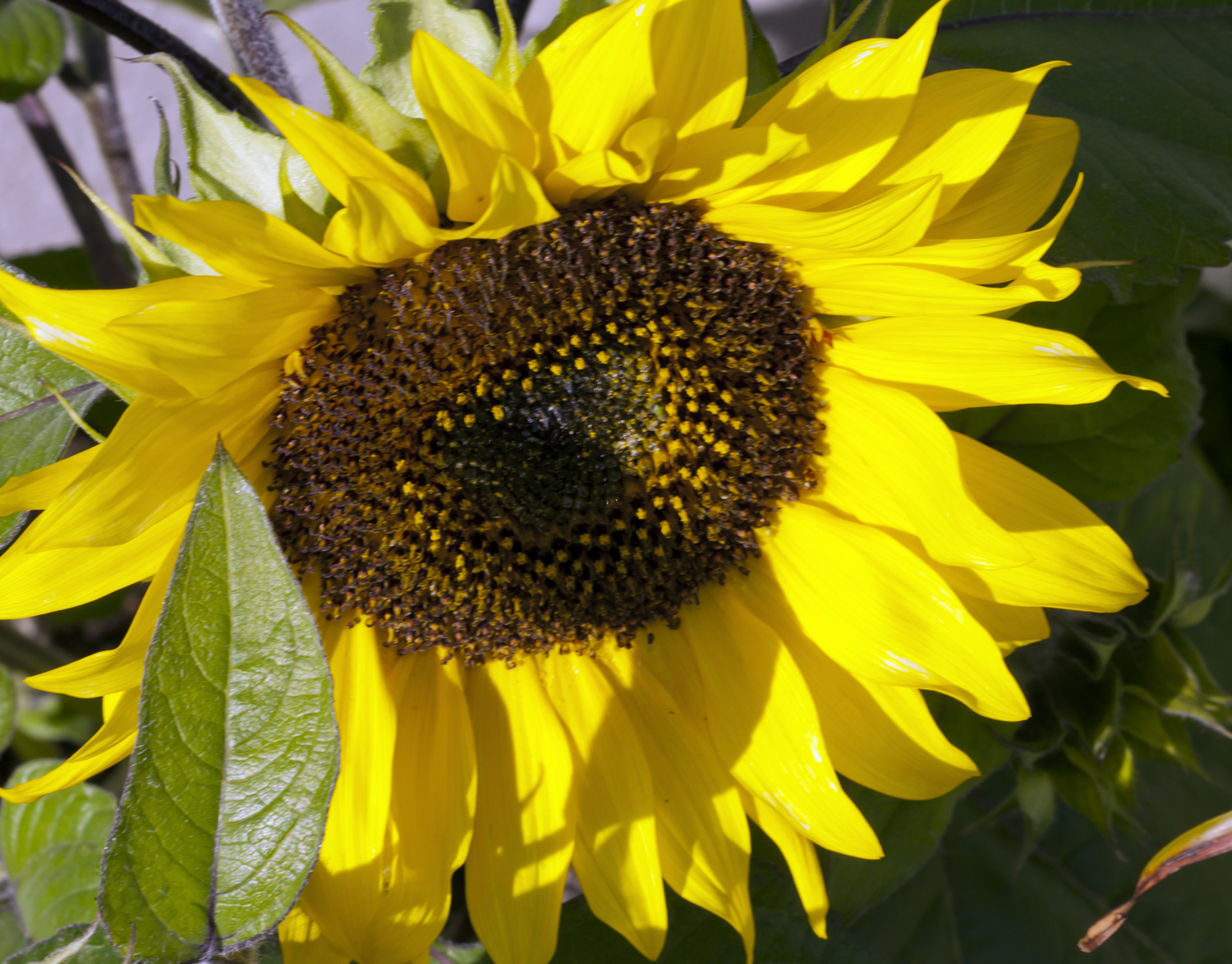
Due to circumstances beyond our control (epic accident on highway causing major delay getting back home), I was unable to take the remaining pictures of the Berkeley Kite Festival today.  As such, I don't feel I have enough suitable photos to make a project, so on to Alternate Project #1, Sunny Day!  This is a collection of shots of a remarkably happy sunflower hanging our at my mother's house. 

Not quite kites, I know, but I still think quite a few of these shots came out well.  I tried to get some fish-eye shots (note: When using a fish-eye, be careful of your fingers!) as well, but the lens is totally manual and I have still not quite mastered it! 

Enjoy! 

(photos will also be posted to anttree.org site within a day or two). 


Saturday, July 30, 2011

Project 50 - Week 4 - Concept

Project 50 - Week 4
Concept - Flying High


This weeks project was put "on-hold" until Saturday, because I wasn't exactly sure of my plans.  My main project, which now seems to be coming out okay, was to take pictures of the Berkeley Kite Festival. Of course, one of the main factors to that was weather - we here in CA have been having a strange summer (fog, really cold, and even some rain!).  Today was, happily, a really nice day so that worked out perfectly.  I did have some back-up projects in case the weather wasn't going to cooperate, but now I can use those another time!  The project won't be completed until Sunday evening, so I'll be editing photos right up to the line! 

Secondly, we are in the middle of a move!  We are leaving our happy little apartment and actually moving into a real house.  Artistically, there are some great benefits to this move, including: We will have a dedicated art/crafts room (which means more craft projects here) and I'll have a dedicated photo studio!

Thank you all for sticking in there and I hope you enjoy this weeks photos!


Monday, July 25, 2011

Project 50 - Week 3 - Leeloo, Fremen Baby

Project 50 - Week 3
Subject: Leeloo, Fremen Baby


It was a close call, but I finished this weeks project!  A bit of a early-week cold and an upcoming move certainly occupied a lot of my time, but in the end I completed the project!  For my week 3 project, I wanted to use some portrait photographs that I recently took of our friend's baby's first birthday party.  I tried to use a few different techniques in these photos, both during the shoot and post-production to give them an interesting look. 


All-in-all, for my first attempt at any sort of portrait shooting, I'm very pleased with the outcome.  Two of the post-production techniques I used for some of the photos include: duo-toning (with a "Warm Gray" filter effect) and tri-toning (as a sepia effect).  Two of the photos I left unaltered, because of how well they show off the blue of her eyes. 


In regards to her amazing blue eyes, the name of this project "Leeloo, Fremen Baby" is a tweak on a "geek joke"; Fremen are the group of characters from the Dune book series (by Frank Herbert) who live on the planet Arrakis and due to their constant consumption of "Spice", all of their eye's have turned "blue-in-blue".  Leeloo clearly has a lot of Spice with her Cheerios.

Enjoy!

Note: a larger version of these photos will be viewable on the www.anttree.org website within the next few days. 


Tuesday, July 19, 2011

Project 50 - Week 3 - Concept

Project 50 - Week 3
Concept

For this weeks project, I've decided to work on some of my portraiture skills.  I am going to try and make a portfolio of 8-12 shots of some baby pictures I recently took.  The trick in this project is two-fold, the first part (which is already complete) was trying to take a more "portrait"-level photograph (compared to just a "snap-shot") and the second part is managing the post-production aspects.

While taking the pictures I was more concerned with the person and trying to isolate them from the background and add a nice bokeh (the soft blurring of the background/foreground in a photo to isolate your subject).  I also used an off-camera flash to try and generate a more natural look and feel.  While taking the shots I constantly had to remind myself; "aim for the eyes!" because no matter how good you think a portrait may look, if the eyes are blurry its going to be rejected. 

For the post-production components, I'm looking a few items: retouching, softening skin tones, color balancing, creating both artistic-looking mono- and duo-toned shots, and formatting the final shots into a complete portfolio (all images standard size, title bar, signature line and layout).

Hope you enjoy the ride!

Friday, July 15, 2011

Project 50 - Week 2 - Rooftop Panoramic

Project 50 - Week 2
Subject: Rooftop Panoramic


Although the weather wasn't quite as supportive as I like, I did complete this weeks project - my Rooftop Panoramic!  This panoramic is comprised of 13 photographs, and shows the view from our apartment's roof.  I tried to be consistent in taking the photographs (focal length, aperture, and shutter speed), as to make the photos all have the same look and feel before combining them.  One odd effect, that I did not expect, was the "curved" aspect of the center part of the shot.  I believe this effect occurred because I was walking along the edges of the roof taking pictures so the shots were not taken from the same "plane" as each other (unlike the first two tests, where I did not really move while taking the photos). Either way, I think the effect is quite interesting, a sort of "mock-fisheye-lens" look.

The overall size of this photo, if printed, would be 8" x 38" (over 3' long!).  I might look into seeing how much it would cost to get a print this large, perhaps on canvas (so I wouldn't have to cut a mat-board or try and find a frame for it!).  I hope you all like it, as before it is a bit of a large picture so to see the large version, click on the small thumbnail picture below and then once it loads click on it again to expand it to the larger size.

Enjoy!

Web-Friendly


Full-Size (11MB)


Tuesday, July 12, 2011

Project 50 - Week 2 - Update #2

Project 50 - Week 2
Update #2

Here is my second attempt at making a panoramic shot of San Francisco.  I know its a bit blurry and pixilation is a bit high, but I think the overall look is pretty good.  As with yesterday's photos, these were more telephoto (around 220mm) than wide-angle.  The amusing part, at least for me, is that the bird (pretty much dead-center of the image) is the clearest part of the photo!

Now, this is a pretty large picture (printed, it would be approximately 34" by 7") and if you click on it to see it "full screen", you might need to scroll a bit left and right.  In total, this panorama is compiled from 7 photos.

Enjoy!

Web-Friendly JPG


Monday, July 11, 2011

Project 50 - Week 2 - Update #1 (Proof of Concept)

Project 50 - Week 2
Update: #1

Today I wanted to try some proof-of-concept ideas I had for my main project this week.  For this proof idea, I used two photos of Highway 80.  The first is shown as the layered idea, with each photo having a frame and "stacked" on top of each other in a somewhat "hap-hazard" way to make them look like they blend together (although if you look closely you'll see some slight errors).  The second is shown as a single photo, with the two separate photos being blended together as one (using PhotoShop, blending, deleting, layer-masks and gradients).

I'm going to try and do another, larger proof in a day or so of San Francisco.  Comments and feedback appreciated!

Enjoy!


Project 50 - Week 2 - Concept

Project 50 - Week 2

Status: Concept

For my Week 2 project, I'm going to try and create a panorama photograph using multiple shots from the top of our apartment building.  We have an amazing view from the Bay Bridge all the way to the Golden Gate (and a bit beyond), and I'd like to show that off in a giant panoramic picture. 

I am going to use my wide-angel lens to give a sense of how "large" the bay is; probably 18-20mm.  For the post-production part, I'm not sure if I want to try and do a single image with no seams or as a composite image with each "snapshot" layered on top of each other for form the panorama (think of printing out a stack of 4x6's and laying them all our on a table to form one giant picture - each small picture would have a small white "frame" to show that it's an individual photo, but when shown with its 'friends' would look a part of a giant work). As a test-run, I am going to try and do a composite with just a few photos so I can get the hang of how to do it.  If having them as single elements looks good, I think I go with that method, otherwise it will be a single giant photo. 

The other element that isn't really under my control will be the weather.  San Francisco is known for its fog and I really want to try and take all the pictures at the same time, so they fit together more uniformly.  So, I'm just going to pick a day and go for it!

I'll post some of the shots that I get as well as some of the test-run works over the next few days.

Enjoy!

Friday, July 8, 2011

Project 50 - Week 1 - Abstract Fireworks

Project 50 - Week 1
Subject: Abstract Fireworks

Week one is coming to an end and I've completed my first project!  For this project, my subject was the fireworks display from the 4th of July ceremony from the Berkeley Marina.  But, unlike many others who were attempting to get clear, cool looking shots of the fireworks exploding, I was try to get a more abstract look by using a few different techniques.  Firstly, I used a relatively slow lens (f/4.5~5.6) to take the photos, as well as only shooting hand-held (to introduce a neat blur effect). Second, I make sure to move the camera while shooting to exaggerate the blur effect.  Lastly, I used the camera in full manual mode, so it wouldn't attempt to "refocus" or "fix" the picture.  I shot about 700 photos, and after three rounds of cuts, I got it down to a final 28 photos.

I decided to use (at least for now), my Flickr site to display this quantity of photos, because a) many of my photos are already on Flickr and this might encourage others to look at my earlier works, b) Flickr is a pretty stable site and c) I've already paid for my Pro status there and I might as well use it!  I will be adding these photos to the AntTree site as well (as a new gallery), so if prefer looking at them via the AntTree site, please do so.

I hope that you all enjoy this first project and I can wait for the next 49!


(Click on Photo to be taken to the Flickr site, of if you prefer, you can click on this link directly: http://www.flickr.com/photos/anttree/sets/72157627025585343/)

Project 50 - Week 1 Update #2

Ok, I'm nearly done with my Week 1 project!  I started with nearly 700 photos, and after 3 rounds of cuts, I got it down to 28 shots.  I'm editing them now and should have them ready to post soon.  My quandary is, how am I going to display 28 shots?! I've thought of a few options:

1) Just post all of the photos here and you can look at them one at a time.
2) Create a Flickr Set with all of the photos in it.
3) Create a gallery on the AntTree.org site.

I'm not quite sure what option I like the best yet, but I'll keep thinking about it as I edit the photos. 

Here's another one that I just finished:


Enjoy!

Ps: I'll be posting these "updates" on my AntTree Studios Facebook page rather than my personal one, so if you want to follow along with the "workflow", please go to the AntTree page.  When the project is completed, I'll post it on both pages. 

Project 50 - Working Week 1

For my first week project, I'm doing a bit of a "homage" to last years Photo 365 project.  Last year, when I started my Photo 365 project, it was on July 4th and I used a photo of some fireworks going off above the Berkeley Marina.  One of the shots that I got was a really neat, abstract photo and when I saw it, I just knew that I wanted to get more shots like that.  So, this year I specifically tried to get more "abstract" photos of the fireworks going off (not that I minding getting any that were not blurry, but I was trying to get a strange blur effect).

I'm hoping to create a gallery of 20-30 of the best shots - but its taking a bit, because I got about 700 photos.  After the first wave of sorting, I've got it down to just over 200, but still a lot of work to go!  Here are a couple that I think will make it:


Hope you all like them!

Thursday, July 7, 2011

A New Day (and Project)

First I would like to to once again thank everyone who took some time out of their day to view my photos over the last year.  I'm glad to say that my Photo 365 project was completed, although it was a bit "touch-and-go" there at the end if I was going to complete all the photos! 

I got a lot of positive and constructive feedback from many of you, and I really appreciated all of it.  Now that I've had a few days to look back and reflect on the project as a whole, I've realized that there were some really great parts and some parts that I would have liked to done over/better.  I realized that one of my favorite parts of the project was the theme weeks and multi-photo elements.  Now that I've realized what parts of the project I enjoyed the most (as well as defining some new goals that I would like to accomplish with my work in the near future), I've decided to start a new project. 

My new project will be called "Project 50", but unlike the Photo 365 project, it won't be something that I do daily, but more of a weekly art project which I will post the results on Fridays. Now, I know you are saying: "Why 50?! Why not 52?!"... well, because I want to be able to take a week off now and then!  Sheesh... you slave-drivers.  In essence, I will still process and show a lot of photos (probably more than the Photo 365 to be honest), but this way I'll have a whole week to shoot, edit and then present my work. 

For some projects, I will be posting updates so you can see some of the "work flow" that I am using to create whatever it is I'm working on.  Other times, it might just be the one post on Friday with the completed work (such as this Friday, because I only started tonight)!  I'm hoping to do more dynamic projects as well (still mostly photo-based), including panoramas, photo-stitching, video editing, and mixed media pieces. 

I hope that you will enjoy this new journey with me and I encourage all of you try any of these projects yourselves - be it a Photo 365, Project 50, Sketch 100, CookieOfTheWeek (I call dibs on any "extra" art pieces you might have with this project).  I also continue appreciate your feedback and comments!

Thanks and welcome back!

Anthony